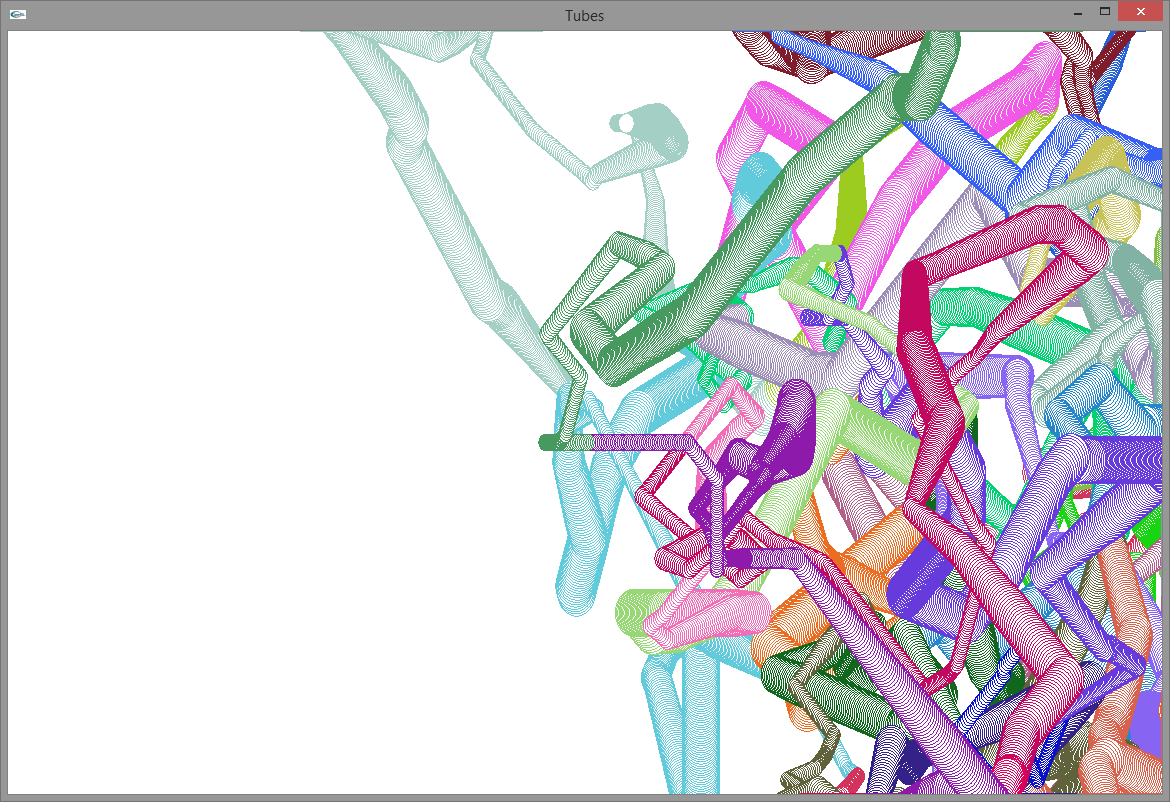
Example 4.5 uses a circle to trace the random walk of a circle across a window. The circle leaves a path as it moves, and it periodically changes its size and its color.
Example 4.5. Circle Random Walk
#include <vector>
#include <GL/sgl.hpp>
#include <fstream>
#include <iostream>

struct Circle {
    double x;          //  The location of the circle's center:
    double y;          //  point (x,y)
    double r;          //  The circle's radius
    sgl::Color color;  //  The circle's color
    //  Constructor requires location, radius, and color information
    Circle(double x, double y, double r, const sgl::Color& color) : x(x), y(y), r(r), color(color) {}
    void draw() {
        sgl::set_color(color);
        sgl::draw_circle(x, y, r + 1);
        sgl::set_color(sgl::WHITE);
        sgl::fill_circle(x, y, r);
    }
};


//  A window that traces the movements of a circle
//  on a random walk.  The trace leaves behind a multicolor
//  tube-like structure of varying diameter
class RandomCircleWindow : public sgl::Window {
    double x;                   //  Current position of the
    double y;                   //  circle's center: (x, y)
    double z;                   //  Circle's radius

    int dx;                     //  Change in x
    int dy;                     //  Change in y
    double dz;                  //  Change in radius

    int run_x;                  //  Length of run for dx
    int run_y;                  //  Length of run for dy
    int run_z;                  //  Length of run for radius change

    bool animate;               //  Are we animating?

    std::vector<Circle> track;  //  Record of all the circle locations

    sgl::Color current_color;   //  The current color for a circle
    int color_run;

    //  Save the current locations to a text file
    void save() {
        std::string filename;
        std::cout << "Enter file name: ";        //  Get file name from user
        std::cin >> filename;
        std::ofstream fout(filename);            //  Open file for writing, if possible
        if (fout.good()) {
            fout << track.size() << '\n';   //  Store number of circles
            //  Store each circle's component data about its location, size, and color
            for (auto& circ : track)
                fout << circ.x << ' ' << circ.y << ' ' << circ.r << ' '
                     << circ.color.red << ' ' << circ.color.green << ' '
                     << circ.color.blue << '\n';
        }
        else
            std::cout << "Could not save the file" << '\n';
    }

    //  Load circle locations from a text file
    void load() {
        std::string filename;
        std::cout << "Enter file name: ";  //  Get file name from user
        std::cin >> filename;
        std::ifstream fin(filename);       //  Oprn the file for reading, if possible
        if (fin.good()) {
            track.clear();            //  Empty the circle vector
            int size;
            fin >> size;              //  Read number of circles
            //  Obtain the location, size, and color information for each circle
            for (int i = 0; i < size; i++) {
                double in_x, in_y, in_z, red, green, blue;
                fin >> in_x >> in_y >> in_z;
                fin >> red >> green >> blue;
                //  Add the circle to the collection of circles
                track.push_back(Circle(in_x, in_y, in_z, sgl::Color(red, green, blue)));
            }
        }
        else
            std::cout << "Could not load the file" << '\n';

    }
public:
    //  Create a window of sufficient size
    RandomCircleWindow(double min_x, double max_x, double min_y, double max_y) :
                         sgl::Window("Tubes", min_x, max_x, min_y, max_y),
                         x((min_x + max_x) / 2), y((min_y + max_y) / 2), z(10),
                         dx(0), dy(0), dz(0.01), run_x(0), run_y(0), run_z(0),
                         animate(true), current_color(0.9, 0.9, 0.9), color_run(0) {
        start_timer(1);   //  Enable animation
    }

    //  Draw the track of all the multicolor circles
    void paint() override {
        for (auto& circ : track)
            circ.draw();
    }

    //  Respond to user's key strokes
    void key_pressed(int k, double mouse_x, double mouse_y) override {
        if (animate)
            animate = false;
        else {
            animate = true;
            start_timer(1);
        }
        animate = !animate;   //  Pause or resume
        switch (k) {
            case 'S':  //  Save the circle track to a text file
            case 's':
                save();
                break;
            case 'L':  //  Load a circle track from a text file
            case 'l':
                load();
                break;
        }
        std::cout << "# circles: " << track.size() << '\n';
        repaint();
        sgl::Window::key_pressed(k, mouse_x, mouse_y);  //  Defer to base class for further processing
    }

    void timer_expired() override {
        //  Determine if a run of each component has run its course
        //  and update if necessary
        if (run_x == 0) {
            run_x = sgl::random(1, 100);  //  Determine length of next run for x
            dx = sgl::random(-3, 3);      //  New x direction and speed
        }
        if (run_y == 0) {
            run_y = sgl::random(1, 100);  //  Determine length of next run for y
            dy = sgl::random(-3, 3);      //  New y direction and speed
        }
        if (run_z == 0) {
            run_z = sgl::random(1, 100);  //  Determine length of next run for the radius
            dz = 0.1* sgl::random(-3, 3); //  New radius
            //dz = 0.1;   //  Fixed radius
        }
        x += dx;   //  Update x
        y += dy;   //  Update y
        z += dz;   //  Update radius
        //  Limit the range of the circle's random walk
        x = (x < min_x - z) ? min_x - z : x;
        x = (x > max_x + z) ? max_x + z : x;
        y = (y < min_y - z) ? min_y - z : y;
        y = (y > max_y + z) ? max_y + z : y;
        //  Bound the circle's size
        z = (z < 10) ? 10 : z;
        z = (z > 30) ? 30 : z;

        run_x--;   //  Completed one more step of the run for x
        run_y--;   //  Completed one more step of the run for y
        run_z--;   //  Completed one more step of the run for radius

        //  Determine if the color has run its course, and a new
        //  color should be generated
        if (color_run == 0) {
            color_run = sgl::random(100, 1000);  //  New run length
            current_color.red = sgl::random(1, 1000) / 1000.0;    //  New red component
            current_color.green = sgl::random(1, 1000) / 1000.0;  //  New green component
            current_color.blue = sgl::random(1, 1000) / 1000.0;   //  New blue component
        }

        color_run--;  //  Completed one more step of the run for this color

        if (animate)   //  Should we continue to track circles?
            start_timer(1);
        //repaint();
        //  Record the information for this circle
        track.push_back(Circle(x, y, z, current_color));
    }
};

int main() {
    sgl::set_random_seed(42);   //  Set the random number generator seed
    //  Make and run a window for displaying the circles
    RandomCircleWindow{0, 1900, 0, 1000}.run();
}
The net effect of
Example 4.5
is that it leaves
an image that resembles multicolored pipes flowing through a
space.
Example 4.5 is responsible for
the art on the
title page of this document.
Figure 4.6 provides a screenshot of one of the random walks.